How to Lose the Police in GTA 6
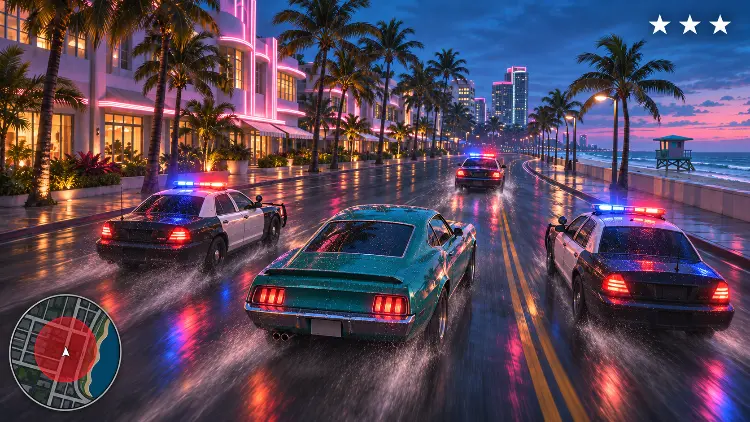
To lose the police in GTA 6, get out of sight, leave the flashing search area on your minimap, and wait for the wanted stars to disappear. Then check whether the map still shows Heat around your last known location. Heat can linger after a chase, and the red icons under your wanted stars show what the game’s police can still recognize. Here’s how to read those signals, tell when a chase is over, and finish the early Unwanted Attention mission.
Guides to Grand Theft Auto VI, in reading order: the full story walkthrough, which edition to buy, every mission, Jason, Lucia and the people around them, the map of Leonida and Vice City, cheat codes, every car, the fastest ways to make money, and every weapon.
- 01GTA 6 Walkthrough: From Lucia’s Prologue to Coming Home
- 02GTA 6 Buying Guide for PS5 and Xbox: Editions, Storage and Accessories
- 03GTA 6 Mission List: All Story Missions and Notable Missions
- 04GTA 6 Characters Guide: Jason, Lucia and the People Behind the Missions
- 05GTA 6 Map: All Locations in Leonida and Vice City
- 06GTA 6 Cheats: All Cheat Codes and How to Use Them
- 07GTA 6 Cars List: All Super Cars, Motorcycles, Boats & Aircraft
- 08How to Make Money Fast in GTA 6
- 09GTA 6 All Weapons: Complete Weapons List
- 10GTA 6 Best Weapons for Different Situations: What to Equip and When
- 117 Fastest Cars in GTA 6 Ranked by Stock Speed
- 12GTA 6 Map vs GTA 5: How Much Bigger Is Leonida?
- 138 GTA 6 Hidden Locations and Secret Places Worth Finding in Leonida
- 14How to Lose the Police in GTA 6
- 15How to Save Your Game in GTA 6
- 16How to Change Clothes in GTA 6
Contributed article
Key takeaways
- 01Flashing wanted stars mean the police have lost sight of you and are searching.
- 02Move outside the flashing search zone on the minimap to escape the police.
- 03Check for Heat on the map after wanted stars disappear to avoid restarting a chase.
- 04Red icons under wanted stars show what the police can still recognize about your character or vehicle.
- 05In the Unwanted Attention mission, lose the cops and take the Phoenix to Pay ’n’ Spray.
Inside this article
- ·Key takeaways
- 01How to lose the cops in GTA 6 step by step
- 02What do flashing wanted stars mean in GTA 6?
- 03How does Heat work after you lose the police?
- 04What do the red icons under the wanted stars mean?
- 05How to lose the police in the Unwanted Attention mission
- 06What to do if your wanted level keeps coming back
- ·Common questions
How to lose the cops in GTA 6 step by step
- Check the wanted stars. Solid stars during a pursuit mean the police can still see you. When the stars start flashing, you’ve broken line of sight and the game has moved into its search phase.
- Read the minimap. Find the boundary of the flashing search zone and move your character outside it. Watch your position on the map as you cross the boundary.
- Wait for the stars to clear. Flashing stars mean the search is still running. If they go solid again, the game has registered a new sighting and the active pursuit has resumed.
- Check for Heat before going back. Once the stars are gone, open the map and check the area around your last known location. If Heat remains, recognition can start the chase again.
A quick way to check your progress: When the stars flash, look at the minimap. When the stars disappear, check the Heat area and any recognition icons. This gives you a clear next step even when the chase music or the action on screen makes it hard to tell what’s happening.
What do flashing wanted stars mean in GTA 6?
Flashing wanted stars mean the police have lost sight of your character and are still searching. This is the part of the chase where the minimap is most useful. A glance at the search boundary tells you whether you’re already outside the area or still need to move. Keep watching the stars as well. They’ll tell you if the pursuit resumes.
| What you see in GTA 6 | What it means | What to check next |
|---|---|---|
| Solid stars during a chase | Police have a visual on your character | Watch for the stars to start flashing |
| Flashing stars and a search zone | Police lost sight of you and are searching | Check whether you’ve crossed the zone boundary |
| Stars gone, Heat still visible | The chase ended, but the area remains under watch | Check the map before returning |
| A red recognition icon | Police can still identify a detail about your character or vehicle | Check which icon is red before changing anything |
The HUD gives you separate cues for the pursuit, the search area, and lingering recognition. A flashing star and a red vehicle icon can appear during the same escape, but they tell you about different parts of the game’s system.
How does Heat work after you lose the police?
Heat can remain around your last known location after your wanted stars disappear. If you return while police can still recognize your character or vehicle, the pursuit can restart. This can catch you off guard when a waypoint leads back toward the area you just left. Before resuming your original route, check whether the waypoint falls inside the marked area.
For example, say your stars disappear after a chase near an activity you planned to visit. The activity marker is still on your map, and so is the Heat area. If you’re in free roam, you can continue elsewhere and return later. If you’re in a story mission, read the current objective first. It may tell you to take a specific vehicle somewhere or clear Heat before the next step unlocks. For help identifying the areas around your objective, see the GTA 6 map guide to Leonida and Vice City.
What do the red icons under the wanted stars mean?
The red icons tell you what police can still recognize in-game. Look for the symbol associated with your vehicle, outfit, or headwear and glasses. After you change the matching detail, check whether its icon turns white. That gives you feedback you can use to see whether the change worked.
- Vehicle icon. If the mission lets you leave the vehicle behind, try switching cars. If the objective requires you to keep it, follow the mission prompt. Unwanted Attention directs you to a Pay ’n’ Spray with the same car.
- Outfit icon. Change into a different outfit. If you only change one accessory and the outfit icon stays red, try a full outfit change.
- Headwear or glasses icon. Check the item wheel for the relevant accessory. After changing it, check whether that icon clears.
If two icons are red, make one change and check the HUD before making the next. For example, if a respray clears the vehicle icon and the outfit icon stays red, you’ve dealt with the car. The outfit is the next detail to check. This is especially helpful in a mission where you want to keep the required vehicle and avoid doing extra work.
How to lose the police in the Unwanted Attention mission
Unwanted Attention gives you an early chance to see the wanted stars and Heat system in action. Jason and Cal go to the police impound in Hamlet to recover an Imponte Phoenix. After you take the car, your objective changes to losing the cops. The Phoenix is also the car you need for the next part of the mission, so use the HUD to track your progress while keeping it with you.
Once the chase clears, follow the objective to Pay ’n’ Spray, then deliver the Phoenix to Brian’s garage. Keep following the prompts after the drop-off. The mission also introduces an outfit change to clear remaining Heat. If you’ve reached the garage and the mission still hasn’t ended, check for the clothing prompt before replaying the chase. For more help with the surrounding story jobs, see the GTA 6 opening missions walkthrough.
What to do if your wanted level keeps coming back
Start by checking when it comes back. If the stars were still flashing and suddenly turn solid, you were spotted during the search. If the stars had already disappeared and return when you enter the same area, check for lingering Heat and red recognition icons. If it happens during a story mission, read the current objective before trying another approach. The game may still expect a respray, a delivery, or an outfit change.
During your next chase, use the HUD in this order: wanted stars, search boundary, then Heat and recognition icons. Each signal answers a different question: Can the cops see you? Are they still searching nearby? Could they recognize you if you return? Once you know which state you’re in, you can go straight to the step that clears it.
Common questions
How many wanted stars can you get in GTA 6?
GTA 6 has a six-star wanted level. The number shows how serious the response is, while the appearance of the stars helps you tell whether you’re in an active pursuit or the search phase.
Does Pay ’n’ Spray clear all Heat?
A respray can address vehicle recognition. Check the other icons afterward, especially if your outfit is still marked. In Unwanted Attention, the respray and outfit change are separate parts of the mission.
Can you lose the cops without changing your outfit?
Yes. You can end the active chase by leaving the search area and waiting for the stars to disappear. An outfit change is relevant when your clothes are still recognized or the mission specifically asks for one.