How to Save Your Game in GTA 6
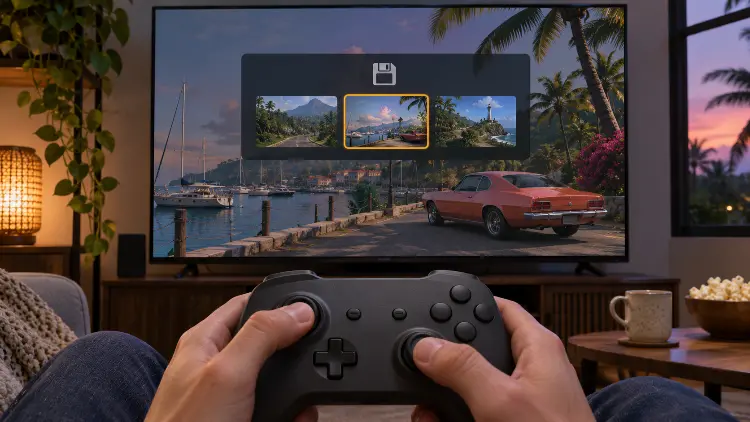
In GTA 6 Story Mode, open the pause menu during free roam and go to Game → Save Game. Use the Options button on PS5 or the Menu button on Xbox Series X|S. Pick a slot, confirm the save, and let it finish before you close the game. If you’re planning to load an earlier file, save your current session to a spare slot first. That extra step gives you a way back to your latest progress if the game updates its autosave.
Guides to Grand Theft Auto VI, in reading order: the full story walkthrough, which edition to buy, every mission, Jason, Lucia and the people around them, the map of Leonida and Vice City, cheat codes, every car, the fastest ways to make money, and every weapon.
- 01GTA 6 Walkthrough: From Lucia’s Prologue to Coming Home
- 02GTA 6 Buying Guide for PS5 and Xbox: Editions, Storage and Accessories
- 03GTA 6 Mission List: All Story Missions and Notable Missions
- 04GTA 6 Characters Guide: Jason, Lucia and the People Behind the Missions
- 05GTA 6 Map: All Locations in Leonida and Vice City
- 06GTA 6 Cheats: All Cheat Codes and How to Use Them
- 07GTA 6 Cars List: All Super Cars, Motorcycles, Boats & Aircraft
- 08How to Make Money Fast in GTA 6
- 09GTA 6 All Weapons: Complete Weapons List
- 10GTA 6 Best Weapons for Different Situations: What to Equip and When
- 117 Fastest Cars in GTA 6 Ranked by Stock Speed
- 12GTA 6 Map vs GTA 5: How Much Bigger Is Leonida?
- 138 GTA 6 Hidden Locations and Secret Places Worth Finding in Leonida
- 14How to Lose the Police in GTA 6
- 15How to Save Your Game in GTA 6
- 16How to Change Clothes in GTA 6
Contributed article
Key takeaways
- 01In GTA 6 Story Mode, save your game by opening the pause menu and selecting Game → Save Game.
- 02Use the Options button on PS5 or the Menu button on Xbox Series X|S to access the pause menu.
- 03Save your current session in a spare slot before loading an earlier file to preserve your latest progress.
- 04GTA 6 provides one autosave slot and 15 manual save slots for different moments in the game.
- 05Organize your save slots by using two for your main playthrough and a third for a specific story moment.
Inside this article
In GTA 6 Story Mode, open the pause menu during free roam and go to Game → Save Game. Use the Options button on PS5 or the Menu button on Xbox Series X|S. Pick a slot, confirm the save, and let it finish before you close the game. If you’re planning to load an earlier file, save your current session to a spare slot first. That extra step gives you a way back to your latest progress if the game updates its autosave.
Make a manual save before you end your session
Start by checking whether you’re free to explore. If a story objective is still active, you may have to finish it before the save command becomes available. Once you’re back in free roam, open the Game tab and choose Save Game. The game lets you do this from the pause menu, so you can end a session while exploring Leonida without making a trip to a safehouse.
The decision that matters most is which slot you use. Choose an empty slot if you’re unsure what an existing save contains. If you’re updating your main playthrough, use a slot you’re comfortable replacing. Once the save finishes, you can leave the game. If you want to double-check before quitting, open Load Game and make sure the manual file you intended to create is listed.
What to do when Save Game is unavailable
If Save Game is greyed out during a story job, look at the current objective. The most straightforward option is to complete the job and save when control returns to you in the open world. During the opening sequence, manual saving also starts out locked. If you’re still working through the early jobs, use the GTA 6 opening missions walkthrough to find your place in the story.
If you only have a few minutes left to play, make your decision before you approach the next mission marker. Say you’ve just finished a job and want to see the next part of the story, but you might have to stop soon. Save while the menu is available. If you end up leaving during the mission, you’ll have a file from just before you started. If you finish the job, you can save the result in a second slot and keep both points.
Use autosave for recent progress and manual slots for specific moments
GTA 6 gives you one autosave slot and 15 manual save slots. The autosave can update after story events, mission milestones, and significant purchases. A manual file lets you choose a specific moment to keep, such as the end of a long free-roam session or the point just before a mission you’d like to play again. Both types of file appear in Game → Load Game.
The difference becomes clear when you’ve spent an evening doing several things. Imagine you finish a mission, make a purchase, and then spend some time exploring an unfamiliar part of the map. If you want to keep the whole session, make a manual save at the end. If you also want to preserve the moment before the purchase, you’ll need to make a separate save before buying anything. Decide which moment you’d actually want to return to, then save at that point.
How to load an older file and keep your latest progress
Save your current session before opening an earlier file. Loading an old manual save can replace your newer autosave, which matters if the autosave is the only place your latest progress exists. Once you’ve saved your current session in its own slot, go to Game → Load Game and choose the older file.
For example, you have a file from before a story mission in Slot 2, but you’ve played another two hours since then. Save those two hours in Slot 5 before loading Slot 2. You can now revisit the earlier mission and return to Slot 5 afterward. If you decide to keep playing from the earlier point, use another empty slot so that both versions remain available.
That approach is useful because GTA 6 launched without a dedicated mission replay option. If there’s a story job you know you want to revisit, make a manual save just before starting it. A file from the beginning of the chapter can also get you back there, although you may have to play through the jobs leading up to it again.
A simple way to organize your save slots
You can start with two slots for your main playthrough and a third for a story moment you want to keep. At the end of one session, save in the first slot. The next time you stop, use the second. That gives you a recent fallback if you decide you want to undo something from your last session. Keep the third slot for a mission you’re looking forward to replaying or a choice you want to explore later.
Before you confirm an overwrite, ask yourself whether that slot is your only copy of a moment you care about. If it is, pick a different one. If you’re simply done playing for the day, update one of your regular slots and wait for the save to finish. The next time you open the game, you’ll know which file to look for.
Common questions
Do you save GTA 6 with the in-game phone?
You can save Story Mode from the console pause menu. In free roam, select Game → Save Game and choose a slot.
Can you manually save halfway through a GTA 6 mission?
The manual save option is usually unavailable during missions. Save before starting a job if you want a file you can return to, or finish the job and save in free roam.
Where do I find my autosave?
Open Game → Load Game. The autosave is listed separately from your manual files.